

Corporate
Americas
United States & Canada
México
America Latina
Brasil
Oceania
Australia
New Zealand
Europe
Asia
India
Indonesia
Malaysia
Philippines
Singapore
Thailand
Vietnam
日本
中国
대한민국
台湾
Other Countries
SATO FAQs LP 100R
SATO, SATO-Logic and KODEscript/KODEscriptPlus are registered trademarks of SATO Corporation and its subsidiaries in Japan, the U.S. and other countries. All other trademarks are the property of their respective owners • Specifications are subject to change without notice.
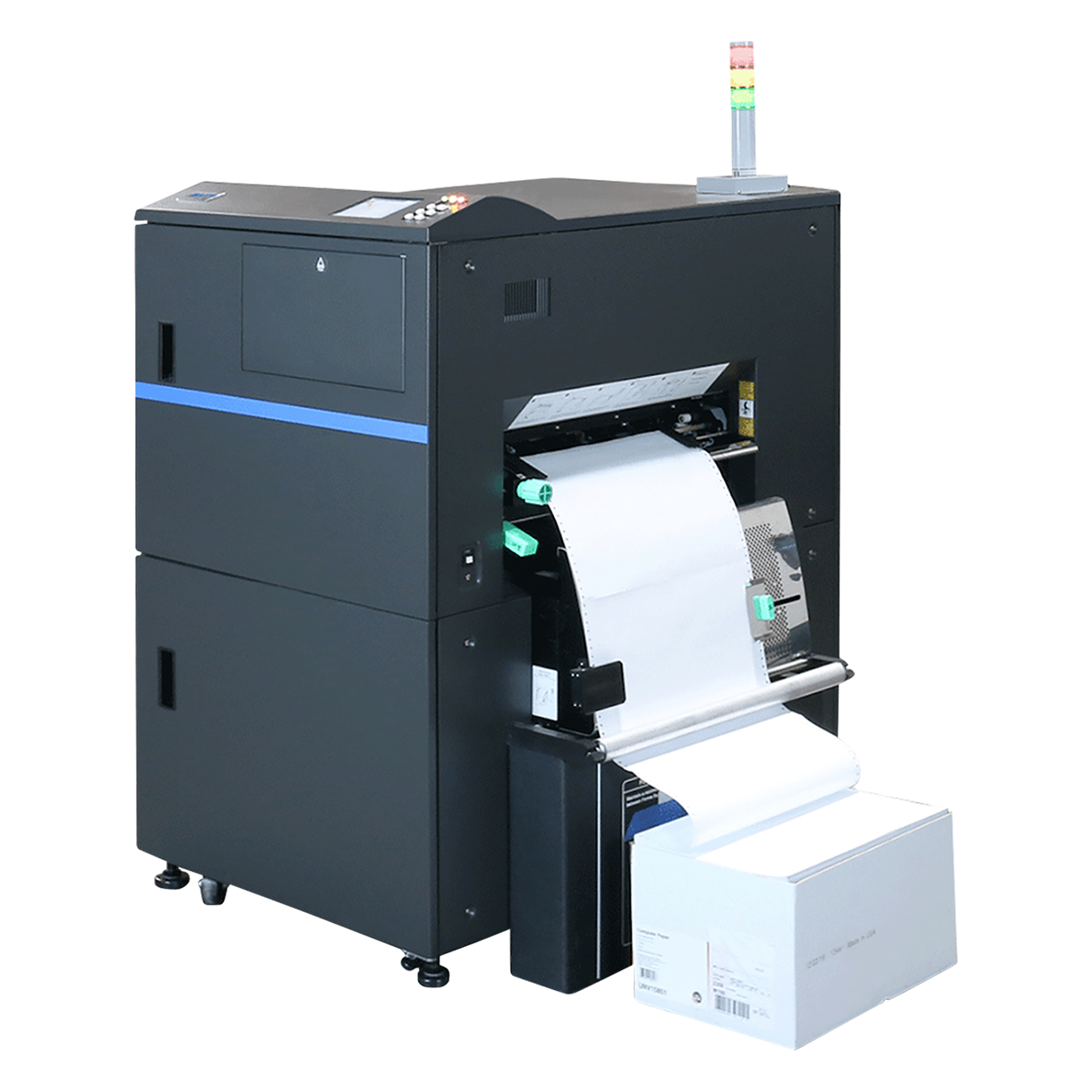
The SATO LP 100R supports continuous feed (pin feed) media both fan folded and roll to roll. The LP 100R supports media from 6” up to 18” wide, 17” image and 5” up to 24” long. Refolding limits at 18” (with a 12” stacker table). The media thickness from 6.5 to 20 mil can be varied and stored at the configuration.
With the SATO-Logic™ controller, up to 999 user configurations can be defined and later recalled to simplify job set-up. The configurations store the media parameters, including the settings to make that media feed smoothly and fuse completely. Balancing media settings can maximize print quality while prolonging consumable life and PM schedules.
A configuration is a set of printer and emulation settings which define the way the controller and printer process the job submitted for printing. A default configuration is supplied to print basic jobs.
Each configuration defines:
- The media parameters
- The resolution of the printer (240, 300, 400, 480, or 600 DPI)
- The emulation of the data file
- Specific parameters applicable to the desired emulation, including but not limited to fonts, control characters, margins, error handling, etc.
- Image specifics such as density (darkness), orientation and alignment
- Applicable parameters for the installed options
Printers with SATO-Logic™ 6.0-00 and higher can define configurations with both numbers and names. Traditionally, the different configurations for each print job are assigned using 3-digit numbers to identify them from one another. When a configuration is transferred (copied) into a printer, these numbers are retained.
Beginning with SATO-Logic version 6.00-00, the configurations can now be given "friendly" names, up to 20 characters long. This allows users to uniquely name the configuration to match the data or form it is being associated with; such as “Green Shipping Label”, making it easier for operators to reference and recall the appropriate configuration settings for the media being printed.
The SATO LP 100R has a 10% longer consumable life span over its closest competitor /predecessor the LIS-1865e. Contact a SATO Sales Representative for details.
The consumable items (bold) are maintainable and replaceable by the user are:
Consumable Item | Product Code | Minimum Stocking Quantity |
Toner Kit (2 bottles) | 9855911 | 2 kits |
OPC Cartridge | 9855012 | 1 each |
Developer Unit | 9855013 | 1 each |
Waste Toner Bottle | 7431963 | 2 each |
Head Cleaner | 910000006000 | 1 each |
Cleaning Pads | 913000027000 | 1 each |
These consumables should be on-hand or in storage at the customer's facility (per printer installed) to ensure maximum production time of the SATO LP 100R. The other items are recommended for routine cleaning/maintenance of the printer as well.
The SATO-Logic™ controller will automatically detect the active communication port and continue to print from that port until all the jobs are complete and the port goes inactive. The user does not have to select the desired communications port.
The active port from which data is being processed is indicated on the User Display panel.
To support Windows and most host environments, SATO-Logic supports:
- Ethernet on the raw port (port 9100)
- As a print server on the LPR port (port 515)
- CUPS (Common Unix Printing System)
- Additionally legacy TCP/IP protocols to the bit level
In addition to communication connections, you may also print directly from a file.
- The print file can be stored on USB media/flash drive
- The print file can be copied/transmitted to the printer via FTP or TFPT file transfer.
- Text languages KODEscriptPlus™ and its predecessor KODEscript™.
- The binary languages HP PCL5e™
- Legacy emulations; IGP/ VGL™ , IGP / PGL™, or basic Line Printer
- Hex dump for diagnostics
- IPDS™ or AFP/IPDS™ (optional)
Be sure to contact SATO Sales Representatives for optional and newly added emulations and features.
LP 100R Printers with SATO-Logic™ version 7.00-00 or later, will act on files copied with FTP and TFTP credentials. The current active configuration will be used to process the file.
The optional Tower Light, offered by SATO is a tri-color light stack (red/yellow/green) which can be placed conveniently in the proximity of the printer to indicate and alert the user about the status of the LP 100R printer.
Some competitive Laser printers use just a single large red light which only indicates when there is an error condition with the printer. In addition to errors, the three-tiered stack light from SATO can be configured to illuminate the specific color LEDs within the Tower light to indicate the various operational statuses, such as Printer ready/Not ready, printing or processing print jobs, and other potential conditions (toner low) which will need attention shortly. This allows greater freedom for the operator to visibly and readily know the printer's condition without need of monitoring the display screen and continue to perform other tasks and notify them when the printer requires operator intervention.
The SATO LP 100R has successfully been used in many environments and replaced numerous competitive manufactures’ printers, including IBM, Ricoh, Printronix and Canon /Océ.
The many standard and optional emulations available on the LP 100R have are capable of accepting native data streams originally designed and destined for competitors. If/when an issue with emulations are identified, the SATO development team can analyze and address/rectify the concern. The SATO-Logic™ controller platform ensures all the solutions will be included in the main stream product release and continue to be supported as the LP 100R continues to evolve. This eliminates special/custom versions of firmware.
SATO-Logic™ is the 8th generation wide web laser printer controller. It includes technology improvements, adjustments to industry trends, and foundation for future features and enhancements.
- Accepts USB media to manage the printer and controller settings, and diagnostic features
- Print from a file (USB) option to test or short run
- Print via file transfer: FTP or TFTP
- Simplification of menus
- The focus of the settings and parameters for emulations and emulation features has been revised to applicable subjects
- Save printer configurations using either the traditional 3-digit number format or simple names (20 characters)
- Legacy communication ports have been cleaned up
- The support of end of life printer models and options have been removed
- Clearer and concise user pages, recognized by the SATO-Logic branding
- These detailed reports, fit on 8.5” x 11” sheet making them easy to share.
- The status page is broken into three sections: Hardware, Communications, and Current Configuration. These sections are dynamically created when requested to reflect the concise settings.
- The Configuration Page report is simplified to eliminate confusion. As emulations, options and settings are selected, only the applicable parameters are listed, thereby eliminating confusion.
- Time and Usage page illustrates in clear progressing bar-graph format the life remaining of all PM intervals and consumables.
- Capture files sent to the print spooler (LPR/CUPS)
- Improved service and support capabilities with:
- Additional logs for network and emulation issues
- Clearer set-up options and defaults
- Network connection verification and error handling
The LP 100Rs sold after April 2019 are built with a larger format Touch Display unit (TDU). This works the same as the ones on previous LP 100R printers. SATO-Logic™ controller version 7.00-00 and later will support either TDU type. The larger format TDU replaced the smaller unit to address obsolescence from our parts supplier, thus assuring the hardware will be available to continue to support the LP 100R.
If necessary, older printers can be retrofitted with the larger TDU as well to provide compatibility with newer models.
- Capitalizing on the industry improvements in the hardware and supporting systems, SATO-Logic™ manages data communications, input file buffering, and file processing, each separately from actual printing. A data intense user will recognize large overall processing improvements in data file transmission and the subsequent processing.
- Easily replace print spoolers by defining the queue name at the printer set-up menu which eliminates the need to edit the settings at the host.
- Added and improved file management features for both set-up and diagnostic, remotely and from the user panel
- Improved job control from the menu setting and user panel during operation
- Improved error handling and recovery;
- For the routine conditions such as form end, toner empty or stacker full.
- Define how to handle including number of pages to reprint in the case of a jam.
- Recover the print job gracefully and without compromise from the unexpected opening of a cover or door.
- Send line printer jobs to PCL emulation and use settings to define CPI and LPI.
- VGL emulation is enhanced with PDF-417 barcode beyond the traditional programming commands.
- Print via file transfer: FTP or TFTP
- Documentation for the laser printer and related products available if you browse the printer IP
- Print from a file (USB) option to test or short run
- Configuration Identification using either the traditional 3-digit numbers or via short names
- Capture files which have been sent to the print spooler (LPR/CUPS)
- Improved service and support capabilities with:
- Additional logs for network and emulation issues
- Clearer set-up options and defaults
- Network connection verification and error handling
User files (unique to the users implementation of the LP 100R) can be:
- Added to a printer
- Copied from one printer to archive or use in another printer
- Removed completely via the menu system
User files can also be managed by accessing the printer remotely and navigating through a menu of options and screens. The specific files themselves can be either presented to the menu system through a USB flash drive or via FTP connection. The directory of user files and content can also be printed via the menu systems.
The Remote Management features were developed and implemented in response to customer requests, primarily from customers with multiple sites, devices or shifts, central administration and support.
The administrators and support groups can remotely:
- Monitor the messages and function to better support the user when an issue arises
- Monitor the life of the consumables and maintenance schedules
- Apply new set-up changes, new user files, configurations, network settings, etc.
- Administrator updates
- Review activity and errors
- Retrieve the data files (capture) and resulting images for advanced diagnostics
- All the requested details which SATO might request when engaging in advanced support can be retrieved remotely.
A SATO-Logic™ Controller can also print a file it detects on USB media (flash drives) inserted into USB ports to transfer/printer user files. You can copy the printer set-up files from one printer and install them onto other printers. You can also copy the various logs and counter information to share with administrative or support groups as well as update the Controller software and printer firmware.
A SATO-Logic™ Controller can also print a file it detects on USB media (flash drives) inserted into USB ports to transfer/printer user files. You can copy the printer set-up files from one printer and install them onto other printers. You can also copy the various logs and counter information to share with administrative or support groups as well as update the Controller software and printer firmware.
- Improved data transmission and processing efficiencies; potentially improves performance
- Improved and additional emulations
- Supports USB media to manage the controller and user files
- Print via USB file or file transfer: FTP or TFTP
- Clearer and concise user menus and status pages
- Configuration identification using either the traditional 3-digit numbers or simple names
- Added diagnostic tools
- Network communications set-up provides verification and feedback during set-up and each initialization cycle. A message will be displayed on the panel if the communication connections are not responding.
- Remote communications in Secure Shell session for added security over open networks
- Staying current with technology protects against obsolesce
- SATO-Logic™users will be best positioned for future enhancements and features
All printers will be produced with SATO-Logic™ controllers and all future development will be in SATO-Logic. Existing installed METO-Logic controllers will be maintained as required. SATO Field Service will proactively upgrade existing installations. For more details, contact your SATO America Service or Sales Representative.
Direct SATO customers who have an LP 100R under a SATO America maintenance contract are eligible for an upgrade. Please inquire through your SATO America Service Department contacts.
End users servicing their own equipment can purchase the SATO-Logic™ controllers to upgrade to their LP 100R Laser printers.
The SATO-Logic™ controller has a print server which can accept multiple jobs ahead of or during printing. LP 100R Printers with SATO-Logic™ version 7.04-00 or later, the queue name can be defined to match your present queues, so no configuration changes are necessary at your host.
The optional three color tower light visually alerts the operator to conditions with the printer and the print job. The Tower Light option empowers the operator to multitask at another station away from the printer. They can monitor the progress of the job and return when operator intervention is needed.
The default settings take advantage of the red, yellow and green lights to indicate the priority and condition of the printer. The default behavior can be customized with a few simple menu options to provide alerts and notifications of errors, warnings, and job status across all three color lights based on defined events.
Using a Windows PCL driver, you can send data from a Windows application to the LP 100R PCL emulation. Some applications include drivers that work best with the application. In those cases, use the supplied driver. When there is not an LP 100R driver included with your application, SATO has you covered.
The SATO PCL windows drivers are MS certified. You have an option of two SATO Windows PCL drivers designed to support the wide width, continuous feed, and variable resolutions of the LP 100R, making them the best choice.
Yes, SATO offers two Windows PCL drivers. There is a traditional type 3 PCL driver that works with all Windows operating systems since Windows 2000. These are referred to as model-specific drivers. There is also a type 4 PCL driver compatible with the Universal Windows Platform released with Windows 8. These are often referred to as Print Class drivers.
Type 4 drivers, or Printer Class Drivers, operate on the UWP (Universal Windows Printing) platform, which was released by MS with Windows 8 and higher. The V3 driver is designed with the older windows to print spooler platform. This platform is the traditional or original standard. As time marches on, more and more applications are updated to support the UWP platform. The type 4 driver is more suited for printer sharing when residing on a Windows server.
Using the SATO LP 100R type 4 PCL Windows driver, you can browse to a file created for any emulation and send that file to the LP 100R. You must be sure the LP 100R is set to match the emulation, and the form size defined when the emulation file was initially created. You can use this feature in the driver to send any type emulation file(s) to the printer.
- The V4 driver supports all five resolutions of the LP100R.
- The V4 driver contains a utility that allows you to send captured emulation files to the printer.
- The V4 driver, because it is compatible with the UWP platform, will allow the user to make changes to the forms size and orientation, resolution, number of copies from the print dialog window in the application at the time of print.
- The V4 driver is easily identified in the devices and printers list, by the realistic icon of the LP100R.
- The V4 driver has been known to resolve strange output experienced with other drivers due to memory leaks and interference from other DLLs.
If using a Windows PCL driver, try the SATO LP 100R Windows V4 PCL driver. The UWP spooler is isolated from other inference with DLLs and unlikely to experience memory leaks.
The version depends on the application you are using and the environment. The later version, V4, is viewed as the later technology, and as more and more applications are upgraded, the UWP platform will be the new norm.
Yes, you can install both SATO LP 100R Windows PCL drivers on the same work station and connect to the same printer. These drivers can co-exist, and you can send them to either one as you wish.
By installing multiple copies of the driver with differentiating names, you can set different printer parameters in each driver. When you print, select the applicable printer for that job. Remember, the printer must be configured to match the job settings.
When making other changes to the environment or application, it would be a logical time to upgrade to the V4 driver. If experiencing spooler crashes or strange output, the V4 driver would be worth trying.
Often print jobs include headers, separators and trailer labels among the many individual details labels. In this case, a user must flip through the printed stack and find the job they seek. Alternatively some jobs also include edge marks which when printed across the fold are visible on the edge of a printed stack of forms. The visible marks let the user visualize where one job end and another start from the stack of printed and refolded forms. With the LP 100R optional Edge Mark, Job Separation feature the printer will add the edge marks to each PCL print job, making jobs visible from the printed stack of forms.
Job Separator Edge Marks are a series of marks printed over the fold making them visible on the edge of the printed forms when refolded / stacked forms. They are a series of 1, 2, or 3 marks printed on every page of the job. When the job changes additional marks are added to the sequence. The series of marks and the change between the number of marks makes it easy for the user to visualize one job from another when viewing the edge of a stack of forms.
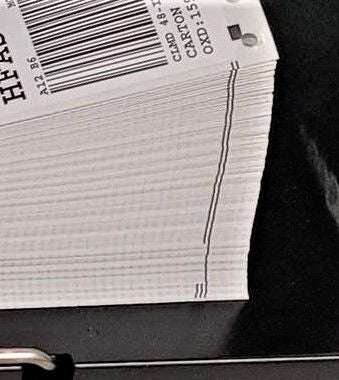
In traditional edge mark solutions, the marks are included in the print date supplied to the printer. They may come direct from the report generator or more likely a middle ware solution such as a print server or job management software which inserts the series of edge marks. With the SATO LP100R Edge Mark, Job Separation option neither is necessary. The LP100R will add the marks at eh printer and increment the number of marks printed each time a new PCL job starts.
The Edge Mark Job Separation feature when installed prints edge marks on any PCL job received. Without added middleware or programming, the edge marks are added by the printer when the job prints.
Once the feature is installed, the marks are simply enabled at the configuration level. Under PCL Emulation Settings you will be able to enable or disable Edge Mark? With the control; at the configuration level, you can quickly include job separation edge marks by recalling a pre-configured set-up. These will work with any PCL data stream, any form size or resolution or orientation.
Once the option is installed you enable the edge marks in the configuration. The job must be a PCL data stream sent to the PCL5e emulation. The option is available in SATO-logic version 7.05-18 or higher. It is factory installed. Contact Sato sales for quotes to have field installed.
SATO Help Center
Need help with setup, usage, or technical issues? The SATO Help Center offers step-by-step guides, support articles, and answers to frequently asked questions.
SATO support starts here
Need specifics on products or pricing?
Connect with our technical experts for fast, reliable support.
Connect with SATO


