A printing issue was discovered with the dithering function of the SATO Windows printer driver.

Corporate
Americas
United States & Canada
México
America Latina
Brasil
Oceania
Australia
New Zealand
Europe
Asia
India
Indonesia
Malaysia
Philippines
Singapore
Thailand
Vietnam
日本
中国
대한민국
台湾
Other Countries
Aug 24, 2023
Notice
Printing issue related to Windows printer driver dithering setting
When it occurs
The error has been observed when changing the dithering setting of printer driver version 8.4.9.27651 from the default value (“Clipart”).
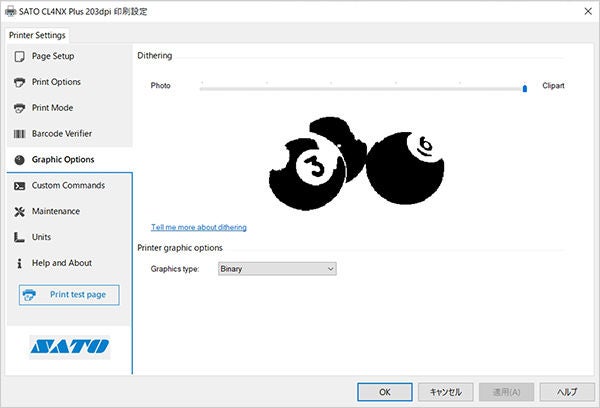
More detail
When printing with Windows printer driver 8.4.9.27651 and the dithering setting is changed to anything other than the default setting (“Clipart”), print results may differ from earlier versions of the driver. This is caused by a dithering function failure and may be more visible when there are tone expressions (color or grayscale images) in the print layout.
Signs you may be experiencing this issue
1. If dithering is set to “Photo,” gradation (in logos, etc.) may not be printed.
*Tested with Acrobat Reader
2. After changing the dithering setting to anything other than “Clipart,” the printed image may not change.
*Tested with Microsoft Excel
This issue was not observed when printing:
- 1D and 2D codes using barcode font or command font
- Text using resident font or command font
- Any content when the driver is used in pass through mode